How Your Small Business Can Utilize AI Tools
Taking advantage of AI doesn't have to be some huge restructuring project for your company. Most of the time, it just means being aware of the simple ways you can use AI to speed up your work, and ensuring your team has access to these tools as well.
There is a lot of noise out there about different AI tools and what you need to adopt to become more efficient. Most of this noise is coming from people who built companies on top of AI and just want you to use their product. This post is coming from the perspective of a small manufacturing company, and how we have utilized various AI tools to make our individual work and company workflows more efficient. Many of these tools have free limited tiers, which is often sufficient for the varying tasks you might have throughout the day as a small business owner. Some tools, like Copilot in Excel, depend on your Microsoft 365 or Copilot license.
Below is a simple list of ways you can use AI for various common tasks at a small manufacturing company, and specific places to go to access the AI tools.
Image editing:
We often take our own product photos for new products we want to add to the website. We then pass these images (often with poor lighting and background) into an AI tool to clean it up, balance the brightness, and remove the background (or adding a fake shadow on a plain background). All of this can be done in a few simple prompts in Google's "AI Studio". Go to https://aistudio.google.com/ (need Google/gmail account), find the "Playground", select "Nano Banana" from the model selection (or the current image tool that doesn't require Pro subscription), and upload your image to the prompt text box with the instructions: "Can you brighten this image up a bit to make it look more professional, less dark, easier to see? Remove the background and any glares. We want it to be on a white background"
Here's the before and after:
Before:
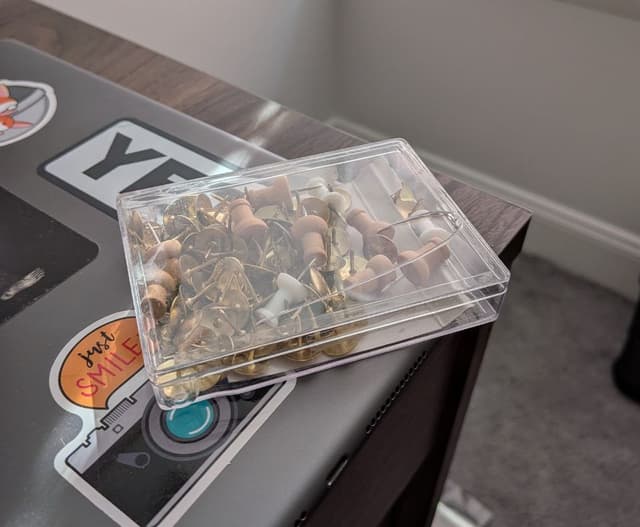
After:

If it doesn't give a perfect response, just type another message letting the model know what's wrong, and it will give it another pass to refine it some more. This was just a quick photo I took right now, but the results will be even better if you find decent lighting and a consistent background to begin with (such as taking the photo on white paper).
Excel Copilot:
Microsoft has been trying to force us to use Teams for years by reinstalling it on every Windows update and giving us popups in every corner of Windows OS to use it. So, any time Microsoft gives us another popup about something else we are very skeptical, but this time we have no complaints. If your Microsoft 365 plan includes it, the Copilot tool in Microsoft Excel can be very helpful. Think of it as the specialized intern who has memorized every formula in existence.
One way that we have used it is for bank rec. We opened the Copilot module from the Excel home tab and told it what we were trying to do (find transactions that match between the bank statement and accounting software, and flag anything that doesn't). It gave us a formula that worked first try. So, if Excel feels overwhelming sometimes, or if you don't want to figure out a formula yourself, you can open the "Copilot" tool from the Home tab of Excel and save yourself a lot of time by telling the AI Agent what you are trying to do with your data (it might require selecting the file manually to give the agent access to viewing it). It is extremely helpful for quickly cleaning or analyzing data.
Cleaning up an email:
If you're one who tends to read and reread your emails several times before sending them, you can potentially save yourself a lot of time by passing your email into a simple chatbot and asking it to refine your response or make it more professional, fix typos, etc. If there is a language barrier between you and the recipient, you can ask the chatbot to remove any confusing points that might make translations confusing. Claude.ai is a great tool for this (free, but requires Google or email account to signup). Just pass your roughly typed email into the text box and ask it to put it into a professional email, without adding words or excessive formatting/bullet points. To provide an example, i've passed this paragraph into Claude and asked it to make it into an email memo. The prompt: Please clean up my email and ensure it is easy to understand/clear/free of typos.
Result:
Hi Team,
If you often find yourself reading and rereading emails multiple times before sending them, you can save time by using a simple AI chat tool to refine your message. These tools can help make your email more professional, correct typos, and improve clarity.
If there is a language barrier between you and the recipient, you can also ask the tool to simplify or clarify any points that might be confusing when translated.
Claude.ai is a useful option (free to use, though it requires a Google or email account to sign up). You can paste your draft into the text box and ask it to rewrite your message as a professional email, without adding unnecessary words or excessive formatting.
For example, I pasted this paragraph into Claude and asked it to turn it into a clear email memo using the following prompt: "Please clean up my email and ensure it is easy to understand, clear, and free of typos."
Best regards,
This is just a simple example, but I encourage you to try it with a wordy email and see if it can shorten the amount of time you spend reading and rereading emails. It is especially worth trying if you're used to people having follow-up questions or confusion after getting your email.
Research or Understanding Technical Documents:
If you're setting up a tool or using a service and they provide documentation, you can make quick sense of how to use the tool by passing the documents to a chatbot such as Claude.ai and asking for help understanding or asking specific questions. It'll provide top-level summaries and be able to point you in the right direction much faster than reading the full set of documents. It is also extremely helpful for summarizing long texts or learning. One of the best uses of AI is assisted learning. You have a knowledgeable teacher-like chatbot at your disposal. It can answer your questions based on documentation or specific topics.
Website Work:
From adding new products to Shopify to completely redoing your site, AI excels at Search Engine Optimization (SEO) and website work. You might want to just add a product to Shopify. Pass product info, configuration, etc to a chatbot such as Claude.ai and ask it to generate a product description for you, asking the model to provide clarity to users while focusing on SEO. If you have similar products, pass those descriptions to the model and ask it to keep a similar style/structure.
Complete Website Overhauls:
If you have a simple website that funnels prospects/customers into methods of contacting you or just provides basic information about your product or service, redoing or improving this is no longer a $1000-5000 bill. You can make a brand new website that excels at SEO and looks professional in less than a day for free. Now, this is still a more tech-savvy task, but anyone can do it. If you want the know-how, send me an email and I will provide the basic structure to point you or your tech-savvy team member in the right direction. It doesn't involve dealing with WordPress or any confusing "Website Building" companies who will put their branding on your website after you struggled to make it through their system. It'll be simple, clean, hosted for free, and search engine optimized. It's easy! I'll help. Email matthew@paxerp.com (if you're a small manufacturer in USA).
AI uses I discourage:
Customer Support / Automated AI chatbots to talk with your customers/prospects.
One of the worst ways a customer or prospect can be treated after asking a question is getting an inhuman automated response. The modern day robot answering machine or outsourced oversees support team is AI customer service reps. If someone contacts you, they are trying to reach a human who knows your company and can quickly point them in the right direction. Unless you have extremely comprehensive documentation or other information available, AI tools for instant customer support or automated emails are NOT a good use of AI. The biggest companies might have a decent implementation of this, but it will be massively complex to implement without extensive documentation provided to the agent, and even then, models are still imperfect and will forget/overlook basic things that a human would not. Your biggest edge over your giant competitors is how you value human relationships. I would not give that up.
Full-auto Content Creation:
Humans are called to create and be creative. The best marketing posts on social media will have heavy human influence. Using elements of AI for design is fine if it makes the process faster without compromising on the creative idea, but a human should be in the driver's seat when it comes to creating or designing something that is supposed to be engaging and creative. AI excels at dull or mundane work. Marketing content, despite how many Ai companies will tell you otherwise, is best done by a human. Human's know best what catches attention, sounds pleasant, and looks good. Unless you're okay with below-average marketing (near 0 clicks), skip the AI on content creation and continue the high-value work that marketing teams provide.
Hiring AI Translators
If you're reading this and still feel overwhelmed - or you simply don't have time to experiment with prompts - don't ignore the technology. Instead, consider changing your hiring strategy. There is massive value in hiring new graduates specifically to act as "AI Translators" for your business. These graduates often already know how to use agents to optimize the mundane tasks that are slowing you down. By bringing in a hungry, tech-savvy grad, they can spend their first 90 days learning your specific manufacturing workflows and then teaching your veteran team how to implement these tools. You don't need a Silicon Valley consultant; you need an entrepreneurial grad who can bridge the gap between your decades of manufacturing expertise and the new world of AI-driven efficiency. Feel free to contact us with any questions or to discuss this further. support@paxerp.com
Written by
Matthew Obey
Here to Help
Have questions about implementing AI in your manufacturing workflow? Let's chat.