How Clean Does Your Manufacturing Data Need to Be Before Moving to ERP?
If you run a small manufacturing shop on spreadsheets, QuickBooks, whiteboards, and tribal knowledge, your data is probably not as clean as you wish it was.
Customer names do not always match. Vendors have duplicate records. Part numbers changed over time. Some inventory counts are current, some are guesses, and some only make sense to the person who made the spreadsheet. BOMs might live in Excel, production notes, or somebody's head.
That does not mean you are not ready for ERP. It means you need to know what has to be cleaned before go-live, what can be cleaned after go-live, and what can be imported or archived as reference history.
For a small manufacturer, ERP data does not need to be perfect before you move. It needs to be accurate enough to support the work your team will run in the system from day one.
The practical rule is simple:
If the data drives a transaction, clean it before go-live. If it mostly explains history, import it for reference or keep it archived.
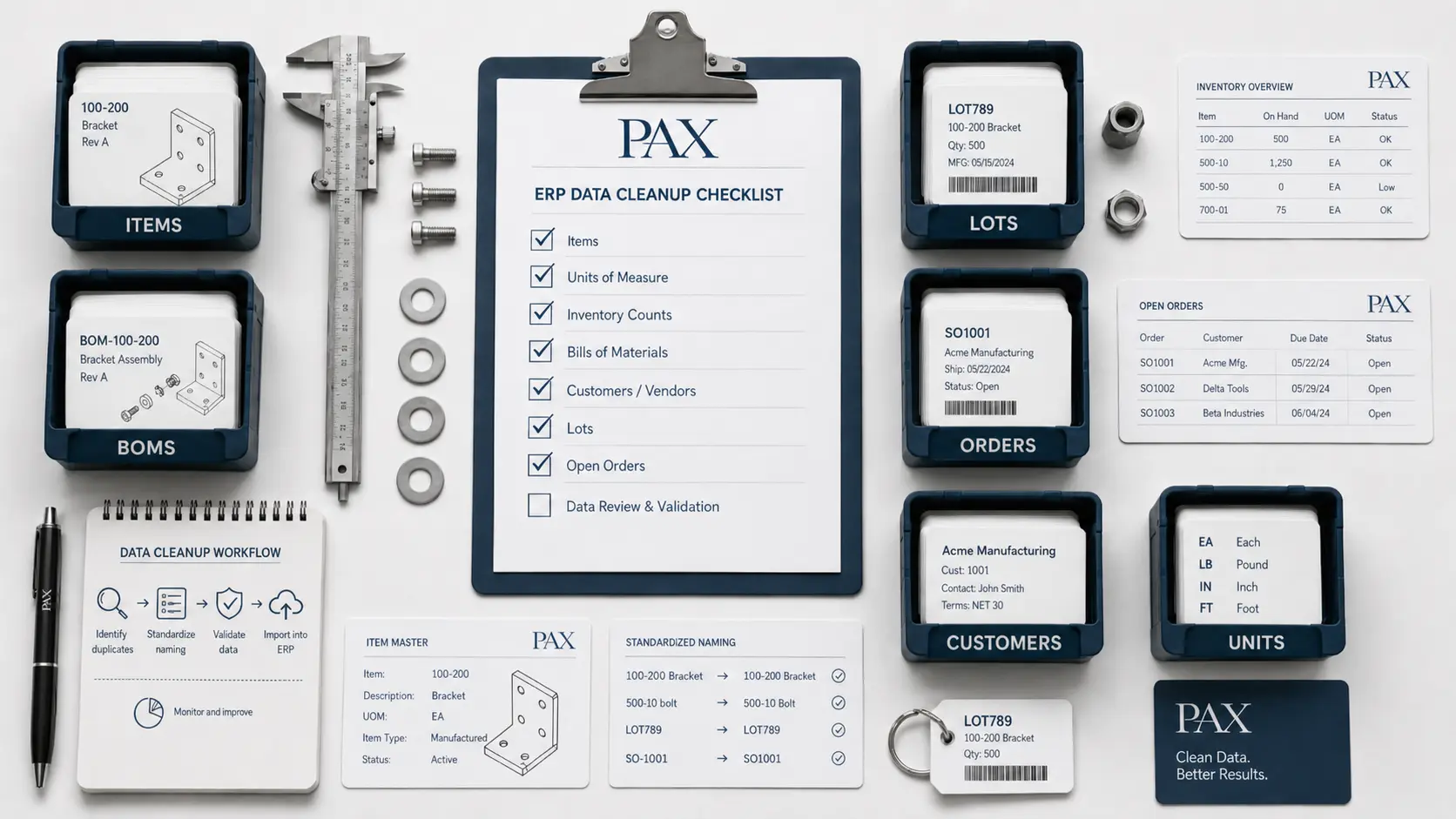
Start with the data your team uses every day
When you move to ERP, the goal is not to recreate every spreadsheet exactly the way it existed before. The goal is to create a clean operating system for the work your team does now.
That usually means:
- Active customers
- Active vendors
- Active items
- Current inventory counts
- Current BOMs
- Open sales orders
- Open purchase orders
- Open work orders, if you are already tracking them
- Chart of accounts, if accounting is going live
- Current lots, if lot tracking matters to your business
Old closed orders, old quotes, inactive customers, obsolete items, and historical notes may still matter. But they usually do not need to hold up the first day of using ERP.
There are exceptions. If you are in a regulated industry, historical lot records, shipment history, device history records, inspection records, or audit records may need to be preserved carefully. That does not always mean they need to be fully imported into the new ERP. Sometimes the better answer is to keep the old system or files available as read-only history.
Related reading: How to Move from Spreadsheets to ERP Without Shutting Down Your Shop
What has to be clean before go-live
1. Item numbers
Your item master is the foundation of the system. If item numbers are messy, everything else gets messy. Purchasing, inventory, BOMs, work orders, shipments, invoices, and AI reporting all depend on knowing exactly which item is being discussed.
Before go-live, active items should have:
- One clear item number
- One clear description
- A correct item type, such as raw material, finished good, component, packaging, or supply
- A correct unit of measure
- An active or inactive status
- Basic buy, build, or sell behavior
This does not mean every item needs a perfect description or every secondary field filled in. But the item number itself needs to mean one thing.
Bad example:
BRACKETBRACKET-1BRKTBRACKET OLDBRACKET NEW
Better example:
RM-BRACKET-001FG-BRACKET-KIT-001
The exact format is less important than consistency. A simple format that your team understands is better than a complex format nobody follows.
2. Units of measure
Units of measure should be accurate before go-live. Units affect purchasing, inventory, BOM consumption, work orders, costing, and shipping. If the system thinks you bought 1 each when you actually bought 1 case of 24, the inventory record is wrong before production even starts.
For each active item, confirm:
- The stocking unit of measure
- The purchase unit of measure
- The conversion between purchase and stock units
- The BOM consumption unit
- The sales unit, if the item is sold differently than it is stocked
- Any case, box, roll, foot, yard, pound, or each conversions that affect real transactions
Example:
A material may be purchased by the case, stocked by the each, and consumed by the each on a BOM. That conversion needs to be right on day one.
This is especially important for manufacturers because the same item can move through purchasing, inventory, production, and shipping in different units. If those conversions are guessed at later, the cleanup can affect inventory quantities, costing, and open work orders.
You do not need a detailed unit structure for every inactive or obsolete item. But for active items that will be purchased, built, consumed, shipped, or counted, units and conversions should be reviewed before go-live.
3. Current inventory counts
Your starting inventory count matters because it becomes the baseline your team works from. If the first count is badly wrong, people stop trusting the system and go back to checking shelves, asking production, or using old spreadsheets.
Before go-live, active inventory should be reviewed for:
- Item number
- Quantity on hand
- Location, if used
- Lot number, if lot tracking is used
- Expiration date, if applicable
- Unit of measure
- ABC code, if you use ABC inventory classification
- Cycle count priority or cycle count schedule
ABC codes and cycle counting are worth setting up early when possible. They help separate the items that need tight control from the items that can be reviewed less often.
For example, high-value or fast-moving items may be marked as A items and counted more frequently. Lower-value or rarely used items may be B or C items. That gives the team a practical way to improve inventory accuracy after go-live without trying to recount everything constantly.
You do not need every obsolete item cleaned up before launch. But if an item is active, stocked, purchased, consumed, shipped, or lot-tracked, its starting quantity should be reviewed before go-live.
4. Current BOMs
BOM data does not need to include every old revision you have ever built. But the BOMs you plan to use now need to be reliable.
Before go-live, each active BOM should answer:
- What finished good does this make?
- What raw materials or components are consumed?
- What quantity is consumed?
- What unit of measure is used?
- Which revision is current?
- Are there known substitutes or alternates?
The bigger problem is not missing old revisions. It is a current BOM that does not match how the shop actually builds the product.
If the ERP says a work order consumes 2 pieces, but production actually consumes 2 boxes, your inventory will be wrong immediately.
5. Open orders and sales history
Open sales orders and purchase orders matter first. You do not want to miss a customer shipment because an open sales order was left behind. You do not want to receive inventory against the wrong PO because purchasing data was only half-migrated.
Before go-live, clean:
- Open sales orders
- Open purchase orders
- Open backorders
- Open customer commitments
- Open vendor commitments
Closed sales order history is also worth importing when possible. Customer purchase history is useful inside the ERP. It helps you see customer trends, repeat items, regular order patterns, and past pricing without digging through an old system or spreadsheet. The important thing is to be clear about what historical orders can and cannot do.
If old sales orders are imported for reference, they may not link perfectly to inventory, finished good lots, or raw material lots. The items may not have existed in the new ERP at the time those orders were created. The inventory movements may have happened outside the system. That is fine as long as the history is treated as reference history.
For future orders created, built, shipped, and invoiced in PAX, the traceability is different. Those orders can connect to inventory, finished goods, raw material lots, work orders, shipments, and customers because the transactions happened inside the system.
So the practical rule is: Import historical sales data when it helps the team. Just do not confuse imported history with live system traceability.
6. Customer and vendor records
Customer and vendor records should be clean enough for quoting, purchasing, invoicing, and shipping. That does not mean every old contact, address, phone number, and note has to be perfect before go-live. The priority is active records.
Before go-live, active customers and vendors should have:
- Correct company name
- Correct billing address, if used
- Correct primary shipping address, if known
- Correct primary contact, if known
- Correct email and phone, if used
- Tax status, if applicable
- Payment terms, if used
- Active or inactive status
The main thing to clean is duplication. If the same customer exists as ABC Medical, ABC Medical Inc, and A.B.C. Medical, order history and reporting can get split across multiple records. That also makes AI reporting less useful because the system may treat those as separate customers.
You do not have to merge every old inactive customer before launch. Start with active customers and vendors first.
7. Lot and expiration data
If you use lot tracking, current lot data needs more care. For a manufacturer that tracks lots, especially in medical devices, supplements, food, chemicals, or regulated products, lot data is not just an inventory detail. It is traceability.
Before go-live, current lots should have:
- Item number
- Lot number
- Quantity on hand
- Location, if used
- Expiration date, if applicable
- Supplier lot, if applicable
- Link to finished good lot, if already built
- Shipment or customer history, if needed for traceability
If old lot history is incomplete, keep it separate and clearly labeled. If it may be needed for audits or recalls, make sure the team can still access it.
For current inventory, though, lot data should be clean enough that your team can answer the basic question:
If this lot has a problem, where did it come from and where did it go?
Related reading: How Small Medical Device Companies Trace Raw Material Lots to Customers
What can usually wait
Some data can be cleaned after go-live. That includes:
- Inactive customers
- Inactive vendors
- Obsolete items
- Old closed quotes
- Old closed purchase orders
- Long item descriptions
- Secondary item attributes
- Marketing notes
- Old contacts nobody uses
- Old pricing records
- Reorder points
- Preferred vendors for low-use items
- Dashboard categories
- Non-critical tags and classifications
This is where a lot of teams get stuck. They delay ERP because they want every old record cleaned first. Six months later, they are still on spreadsheets, and the data is even messier than before. Most of the time, that tradeoff is not worth it.
Clean the data that affects current operations. Archive the rest. Then improve the system as you use it.
What you can clean as you go
Some data actually gets easier to clean after go-live because the team starts using the system every day.
Reorder points
You can set basic reorder points before go-live, but many shops need a few weeks of real ERP usage before they know what the reorder points should be. Start with the obvious critical items. Improve the rest over time.
Item categories
Item categories are useful for reports, filtering, and purchasing. But they do not always need to be perfect on day one. If the item number, unit of measure, and active status are correct, categories can often be refined later.
Vendor part numbers
Vendor part numbers help purchasing. But if you do not have them all ready, you can add them as purchase orders are created. Do not hold up go-live because a low-volume supplier catalog is incomplete.
Customer contacts
Primary customer contacts matter. Every old contact does not. Add and clean customer contacts as your sales, customer service, and accounting teams interact with them.
Customer addresses
Customer addresses are often easier to clean as new orders are entered. Old spreadsheets usually have inconsistent address formatting. Some addresses include attention lines. Some include old contacts. Some are missing suite numbers. Some use different abbreviations. Some are formatted in a way that works for humans but not for shipping labels.
Moving to ERP is a good time to standardize ship-to addresses as they come up in real work. For each new shipment, review the customer address against the address format expected by the carrier or shipping integration. Follow USPS, FedEx, or carrier-specific address layout rules where they apply, including line structure and character limits. This is especially useful in a system like PAX where shipping activity can connect back to the customer, sales order, invoice, inventory, and lot records.
You do not need every old customer address cleaned before launch. But each new order is a chance to clean the ship-to record your team will actually use.
Historical reporting
Customer purchase history should usually be imported when possible. It is helpful to see what each customer has bought before, which items they order regularly, how order volume has changed, and what pricing looked like over time. That information is much more useful when it is available inside the ERP instead of sitting in an old accounting system or spreadsheet.
The main limitation is traceability. Historical sales orders imported into the ERP may be useful for customer reporting, but they may not link to inventory, finished good lots, raw material lots, or work orders the same way future PAX transactions will. That is still worth doing in many cases.
Treat imported history as customer and sales reference data. Treat new PAX transactions as the source for live inventory movement, lot genealogy, order fulfillment, and future reporting.
Why this matters more now with AI
In 2026, clean ERP data matters even more because AI is starting to sit on top of business systems.
That does not mean AI fixes bad data. It usually means the opposite.
AI can help users ask better questions, summarize reports, and find patterns faster. But it still needs clear records underneath.
If a customer has three names, an AI assistant may split the answer across three records. If a part number was reused for two different products, the answer may be technically correct but operationally useless. If a lot number is missing, AI cannot invent traceability.
Good AI in ERP depends on ordinary operational data:
- Clean item numbers
- Consistent customer names
- Correct dates
- Clear order numbers
- Accurate inventory
- Reliable lots
- Defined user permissions
- Read-only reporting boundaries
That is why the goal is not just to move the data. The goal is to create data your team and your tools can trust.
AI can help with cleanup. It can flag duplicate names, inconsistent descriptions, missing fields, unusual units of measure, and records that look incomplete.
But a person still needs to approve changes that affect inventory, accounting, quality, customer records, or lot traceability. AI can suggest cleanup. Your team should approve the final data that goes into the ERP.
Related reading: AI in ERP for Manufacturers: Practical Use Cases
How to tell if your data is ready enough
You are probably ready to move if you can answer these questions:
- Which customers and vendors are active?
- Which items are active?
- What units of measure do we actually use?
- What inventory is currently on hand?
- Which BOMs are current?
- Which sales orders are still open?
- Which purchase orders are still open?
- Which lots are currently in inventory?
- Which records are historical only?
- Who on your team can verify each area?
The answers do not have to be perfect before you start the conversation. But each area needs an owner who can review the data and decide what should be imported, corrected, archived, or ignored.
For example:
- Sales or customer service may review customer records and open sales orders.
- Purchasing may review vendors and open purchase orders.
- Production may review BOMs and work orders.
- Inventory may review counts, locations, lots, cycle count rules, and ABC codes.
- Accounting may review payment terms, tax status, chart of accounts, AR, and AP.
Migration slows down when every spreadsheet is owned by everyone but no one can approve changes. Before import, assign someone to each area. They do not need to clean every record themselves, but they should be able to confirm whether the data is ready enough to use.
When you are not ready yet
Sometimes, a company really is not ready. You may need more cleanup before ERP if:
- Nobody trusts the current inventory count
- Active and inactive items are mixed together with no way to separate them
- Current BOMs are not known
- Open orders are unclear
- Multiple spreadsheets disagree and nobody knows which one is right
- Lot records are required but missing
- Accounting balances are not ready and accounting is part of go-live
- The team cannot agree on basic workflows
If those items are unclear, do a cleanup pass before configuration. That does not mean delaying ERP for months. It means separating the data that affects current operations from the data that can be archived or cleaned later. Start with the records that will affect day-one transactions: active items, inventory, BOMs, open orders, lots, customers, vendors, and accounting setup if accounting is going live.
How PAX handles this
PAX is built for small manufacturers with 5 to 50+ employees and simple-to-moderate BOMs. The normal path is straightforward. You send the data. We help map and import it. We review your workflows. Then you go live.
For shops with clean enough data, that can happen quickly. That is the kind of project where a 3-day go-live is realistic. But live in 3 days does not mean your spreadsheets have to be perfect before you talk to us. It means the system is designed to avoid the months-long consulting project that comes with heavier ERP platforms.
If your data needs cleanup, we can help. Duplicate customers, inconsistent item names, messy spreadsheet formatting, and basic import mapping are normal parts of moving from spreadsheets to ERP. Messy data is normal. The goal is to get it into a structure your team can actually use.
If your operation is too complex for PAX, we will tell you. Multi-site manufacturing, deep engineer-to-order workflows, heavy PLM integration, or advanced regulatory requirements may call for a larger system.
But if you are a small manufacturer trying to get out of spreadsheets, QuickBooks workarounds, and disconnected files, your data probably does not need to be perfect. It needs to be ready enough to start.
Related reading: Manufacturing ERP Implementation Cost: What Small Manufacturers Actually Pay in 2026
The bottom line
Do not wait for perfect data. Perfect data is usually a moving target.
Clean the records that affect current operations. Be honest about what is messy. Import useful sales history where it helps the team. Archive history where that makes more sense than importing it. Improve the details as your team uses the system.
That is the practical path for a small manufacturer moving to ERP.
If you are not sure whether your data is clean enough, send us what you have. We will tell you what is ready, what needs cleanup, and whether PAX makes sense for your shop.
Written by
Matthew Obey
May 21, 2026
Have questions about your ERP data?
Send us what you have. We will tell you what is ready, what needs cleanup, and whether PAX makes sense for your shop.