Use this workflow to ask Paxy for PAX workflow or system help, or to ask a focused ERP and CRM data question if you have access.
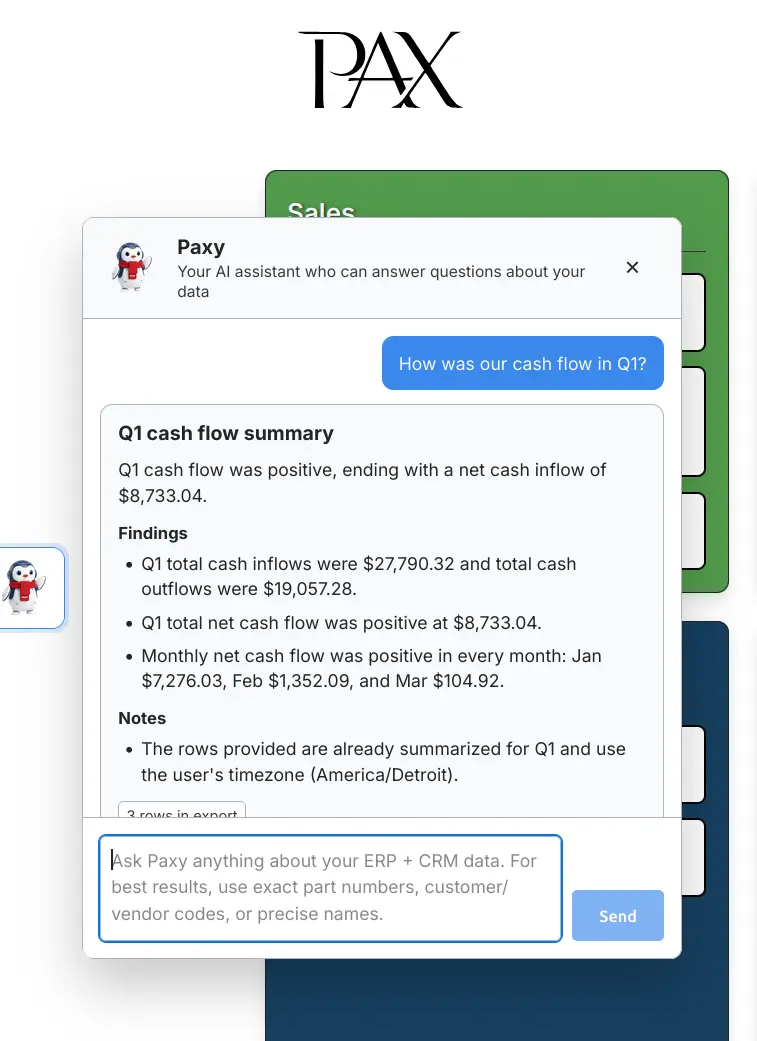
When to use this workflow
Use Paxy when you want help understanding a PAX screen, workflow, or system feature, or when an authorized user needs a quick read-only answer from data already in PAX.
Paxy works best when you ask one focused question at a time and include exact screen names, workflow names, report names, or business identifiers.
Before you start
You need:
admin,executive,csr,sales, ormanufacturingaccess for workflow or system help questions.adminorexecutiveaccess for data-report questions and CSV/PDF exports.- A focused question.
- Exact identifiers when available, such as customer code, vendor code, part number, order number, invoice number, PO number, work order number, screen name, report name, or date range.
Users with floor access use the shop dashboard and do not see the Paxy launcher.
Each question can be up to 1,500 characters.
Screen path
Dashboard > Paxy launcher
Steps
- Open the main PAX dashboard.
- Select the Paxy launcher on the left side of the screen.
- Type a question in the Paxy text box.
- Press
Enteror selectSend. - Wait for Paxy to respond.
- Read the answer at the top of Paxy's response.
- For workflow-help answers, expand
DetailsorNotesif needed and useSourcesto open the related support pages. - For data-report answers, review the answer, findings, notes, row count, and whether a preview cap was applied.
- Use
CSVif you need supporting rows for a data-report answer. - Use
PDFif you need a concise findings report for a data-report answer.
Use Shift+Enter if you need a line break in the text box instead of sending the question.
You can close Paxy while it is working. If the answer finishes while the panel is closed, the launcher shows a red notification badge. Reopen Paxy to see the answer.
Good question patterns
Use exact screen names, workflow names, identifiers, and date ranges.
Workflow-help examples:
How do I record a vendor payment?
What is Vendor Payments used for?
Where do I configure FedEx?
How do I email an invoice?
What does the Open Orders by Part Number report show?
Data-report examples:
What were total invoice sales to CUST-001 in 2025?
When did we last receive PART-100(REV-A)?
Show purchases from VEND-001 so far in 2026.
Which customers bought MFG-PART-001 last year?
What is currently on hand for part 7506(25PR)?
What open vendor invoices are due this month?
Less useful examples:
How are we doing?
Show me that vendor thing.
What happened with the part?
If you do not know the exact identifier, include the most precise name, date range, screen, workflow, and business context you have.
What happens behind the scenes
PAX sends Paxy the current question, limited recent chat context, and the user's browser timezone.
For workflow-help questions, PAX includes the published documentation index in the routing step, validates the selected documentation pages, fetches only those Markdown pages, and asks Paxy to answer from the selected docs. Paxy returns public support-page links in Sources.
For data-report questions, PAX verifies admin or executive access before reading tenant data. It routes the question to relevant data groups, builds a filtered schema summary, asks the AI model to prepare a read-only report query, validates the query, runs it in a read-only transaction, limits the result, and summarizes the returned rows.
For casual messages, Paxy can respond briefly without running a report or fetching selected support pages.
Troubleshooting
Send is disabled
Likely cause: The question box is empty or Paxy is already working on another question.
Safe fix: Enter a question or wait for the current answer to finish.
Contact support if: Paxy is not working but the button remains disabled.
Question must be at most 1500 characters
Likely cause: The question is too long.
Safe fix: Ask a shorter, focused question. Use follow-up questions for extra detail.
Contact support if: A short question still triggers the limit.
Paxy says data questions are limited
Likely cause: Your role can use Paxy for workflow help but not for tenant data questions.
Safe fix: Ask a workflow or system help question, use standard PAX reports, or ask an admin or executive user to run the data question if appropriate.
Contact support if: You have admin or executive access but still receive the data-access message.
The report query timed out
Likely cause: The question requested too much data or a broad calculation.
Safe fix: Add a date range, customer, vendor, part, or status filter and ask again.
Contact support if: A narrow question times out repeatedly.
No matching rows were found
Likely cause: The identifier, spelling, date range, status, or source data does not match PAX records.
Safe fix: Verify the identifier in the related PAX screen and ask again with the exact value.
Contact support if: The record exists and should match the question.
Paxy cannot find a support page
Likely cause: The question may not match the published documentation index.
Safe fix: Ask again with the exact screen, report, button, or workflow name.
Contact support if: A published support page exists but Paxy still cannot use it.